How to Research Products and Sellers on the USFans Spreadsheet
Learn how to research products and sellers on the USFans Spreadsheet, compare marketplace listings, review seller activity, identify warning signs, and choose stronger product links.
GoGo Finder
7/13/20269 min read
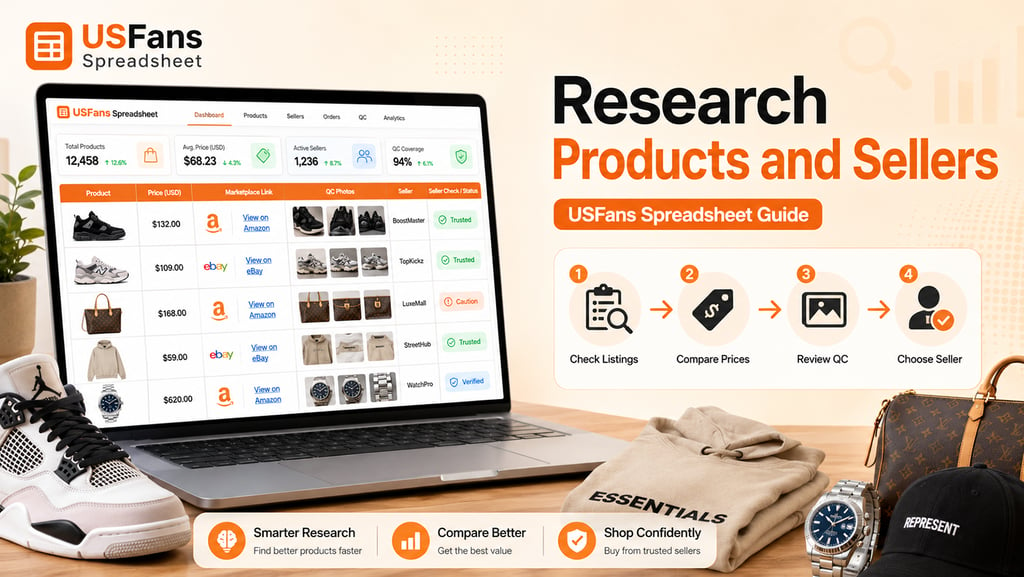
Finding a product on the USFans Spreadsheet is only the first stage of the buying process.
A spreadsheet entry can help you discover a product, identify its category and access the original marketplace link. However, it does not automatically confirm that the seller is reliable, the product is still available or the listing offers the best value.
Before submitting an order, buyers should research both the product and the seller behind it.
This means reviewing the original Taobao, Weidian or 1688 listing, checking product options, comparing prices, studying seller activity and looking for warning signs that may create problems later.
This guide explains how to research products and sellers on the USFans Spreadsheet before making a purchase.
Why Product and Seller Research Matters
Chinese marketplaces contain a large number of sellers offering products that may look similar in preview images.
Two listings can use almost identical photos while offering very different:
Materials
Measurements
Product versions
Quality consistency
Seller service
Return conditions
Delivery speed
Final pricing
A spreadsheet simplifies product discovery, but it cannot remove these differences.
Research helps buyers understand what they are actually ordering rather than relying on a short title, cover image or low price.
Good research can reduce the risk of:
Ordering the wrong product
Selecting an inactive listing
Receiving an unexpected version
Missing important sizing information
Choosing a seller with weak communication
Losing access to returns or exchanges
Paying more for a listing without meaningful advantages
The goal is not to find a completely risk-free seller. No marketplace listing can guarantee that. The goal is to gather enough information to make a more informed choice.
Start with the USFans Spreadsheet Entry
Begin by reviewing the information available in the spreadsheet.
A USFans Spreadsheet entry may include:
Product title
Preview image
Category
Estimated price
Original marketplace link
Seller or store reference
QC photo information
Product version or batch notes
Purchase link
Use this information to decide whether the listing deserves further research.
Do not assume that every spreadsheet entry contains the latest marketplace data. Sellers can change prices, remove products or replace available options without notice.
The spreadsheet should therefore be treated as a discovery tool rather than the final source of product information.
Open the Original Marketplace Listing
The original marketplace listing is the most important page to inspect before ordering.
Open the linked Taobao, Weidian or 1688 page and compare it with the spreadsheet entry.
Check whether the following details still match:
Product title
Product photos
Current price
Available sizes
Color options
Version choices
Seller name
Domestic shipping fee
Stock status
Minimum order quantity
If the listing has changed significantly, do not rely on the old spreadsheet description.
For example, a seller may reuse an existing listing for a different product or remove one version while keeping the page active.
Always base your purchase decision on the current marketplace page.
Understand the Difference Between a Product and a Listing
A product and a marketplace listing are not exactly the same thing.
A product refers to the item you want to buy. A listing is the page a specific seller uses to offer that item.
The same product style may appear in several listings, and each listing may have different:
Prices
Photos
Sizes
Product versions
Shipping fees
Seller conditions
Quality levels
This is why searching for the product name alone is not enough.
You need to evaluate the specific listing and the seller connected with it.
A strong-looking product can still come from a weak listing, while a less attractive thumbnail may lead to a more detailed and reliable product page.
Check Whether the Listing Is Active
Before comparing quality, confirm that the product can still be purchased.
Signs of an active listing may include:
Current size or color options
Recently updated product information
Available stock
Active seller store
Working purchase options
Recent customer or transaction activity where visible
Possible signs of an inactive or abandoned listing include:
No selectable options
Missing product images
Unavailable stock
Broken purchase button
Seller store with little activity
Product page redirected to something unrelated
If a listing looks inactive, search for another seller or product link rather than forcing the order through an outdated page.
An inactive listing can create delays because the shopping service may need to confirm availability or cancel the order later.
Review the Product Title and Description
Marketplace titles can be incomplete, translated poorly or designed mainly for internal search.
Do not rely on the title alone.
Read the product description and compare it with:
Preview images
Option names
Size charts
Material details
Version notes
Seller instructions
Look for contradictions.
For example, the product title may describe one material while the detailed description lists another. A listing may advertise several styles, but only one version may be available in the product options.
If the product information is unclear, add a note to your order or choose a listing with better documentation.
Clear information is especially important when the product has multiple versions, sizes or customization options.
Compare the Current Price
Price is useful, but it should not be the only decision factor.
When comparing similar USFans Spreadsheet listings, check:
Product price
Domestic shipping fee
Minimum quantity
Optional service costs
Return-related costs
Differences between versions
A lower product price may become less attractive if the listing has:
Expensive domestic shipping
Limited return support
Missing size information
Weak seller activity
Few usable QC examples
A higher price may be reasonable when it reflects a different product version, better materials or more consistent recent QC results.
However, price alone does not prove quality.
The most useful comparison is not “Which listing is cheapest?” but “What does the buyer receive for the complete cost?”
Check the Seller Store
The seller’s store can provide more context than one product listing.
Open the store page where possible and review:
Number of active products
Similar products in the store
Store organization
Consistency of product images
General price range
Signs of recent activity
Store age or marketplace history where visible
A store with several related products may indicate that the seller specializes in a particular category.
For example, a seller focused on footwear may provide more detailed size and version information than a general seller offering unrelated products.
However, a large store is not automatically better. Some smaller sellers may offer stronger service or more specialized products.
Use store information as one part of the overall evaluation.
Evaluate Seller Activity
Seller activity helps indicate whether the seller is currently operating and responding to orders.
Depending on the marketplace, you may be able to observe:
Recent transactions
Updated listings
New product uploads
Customer interactions
Store activity
Stock changes
An active seller is generally easier to work with than one whose listings appear abandoned.
Inactive sellers can create:
Slow order confirmation
Long domestic shipping delays
Unavailable products
Canceled orders
Difficulty arranging returns
Activity does not guarantee quality, but it can help reduce operational problems.
Review Product Photos Carefully
Seller photos can provide useful information, but they should be interpreted carefully.
Marketplace listings may contain:
Seller-taken product photos
Factory images
Promotional images
Catalog photos
Customer images
Detail close-ups
Look for consistency between different images.
Check whether the photos show:
Multiple angles
Materials and texture
Labels and tags
Stitching
Product measurements
Packaging
Available colors
Realistic lighting
A listing that relies only on highly edited promotional images gives you less information than one with clear, consistent product photos.
Do not assume that every image shows the exact version currently being sold.
Compare Seller Photos with QC Photos
QC photos are particularly useful when researching a listing because they show items that reached a warehouse.
Compare available QC photos with the seller’s listing images.
Look for differences in:
Shape
Color
Material appearance
Stitching
Labels
Size tags
Proportions
Packaging
Historical QC photos can reveal whether the listing regularly delivers a consistent product.
However, older QC photos should not be treated as permanent proof. Sellers may change factories, batches or versions over time.
Recent QC photos are usually more useful than images from much earlier orders.
Check Product Options and Variants
Many marketplace listings include several products under one URL.
A listing may combine:
Different colors
Different materials
Different batches
Different sizes
Different product models
Budget and premium versions
Review every option carefully before ordering.
The lowest displayed price may apply only to:
A small accessory
A deposit
A basic version
A sample
One low-cost variation
Do not assume that the headline price applies to the exact version shown in the cover image.
Select the correct option and confirm that its price, size and description match your intended product.
Examine the Size Information
Sizing is one of the most common sources of purchasing mistakes.
Check whether the listing provides:
Clothing measurements
Shoe length
Insole length
Waist measurements
Product dimensions
Size conversion guidance
Do not depend entirely on labels such as S, M, L or XL.
Two sellers can use the same size label for products with different actual measurements.
Compare the seller’s size chart with:
Your body measurements
Clothing you already own
Warehouse measurements from past QC photos
Expected fit
If a listing lacks useful sizing information, consider choosing another seller or requesting clarification.
Review Materials and Construction Details
If the product description mentions materials, compare those claims with the listing and QC images.
Look for details such as:
Fabric composition
Leather type
Sole material
Hardware
Lining
Stitching
Product weight
Thickness
Material terms may be translated inconsistently, so use both written information and visual evidence.
A seller who provides detailed construction information may be easier to evaluate than one using only general claims such as “premium quality” or “best version.”
Marketing language should never replace specific product details.
Check Domestic Shipping Fees
Domestic shipping is the cost of moving the product from the seller to the warehouse.
Some listings include domestic shipping in the product price, while others charge it separately.
When comparing sellers, check:
Domestic shipping amount
Free shipping conditions
Region-based charges
Additional quantity fees
Return shipping responsibility
A listing that appears cheaper may have a higher domestic shipping fee.
Domestic shipping may be a small cost compared with international freight, but it still affects the complete order price.
Check Minimum Order Requirements
This is especially important when using 1688.
Some suppliers may require:
A minimum number of units
Multiple colors
A minimum order value
Wholesale quantities
Mixed-size combinations
A low displayed price may only apply when buying several units.
Confirm the quantity requirements before submitting the link.
If you only want one item, make sure the seller allows single-unit purchasing or that the shopping service can negotiate the order.
Review Return and Exchange Conditions
A product may look attractive, but weak return conditions can make the purchase less flexible.
Check whether the seller appears to accept:
Returns
Exchanges
Wrong-size claims
Wrong-color claims
Defective product claims
Important considerations include:
Return deadline
Domestic return shipping
Seller approval
Product condition requirements
Non-returnable categories
Customized products
Seller policies can vary significantly.
A listing with a slightly higher price but clearer return support may provide better overall value than a cheaper non-returnable item.
Identify Warning Signs
Some marketplace listings contain signs that deserve extra caution.
Possible warning signs include:
Price far below similar listings
Conflicting product photos
Missing size information
Unclear product options
Inactive seller store
No recent product activity
Broken or replaced listing
Limited product details
Promotional claims without evidence
Seller images unrelated to QC results
Unusually long domestic shipping
No return or exchange support
One warning sign does not always mean the product is unsuitable.
However, several warning signs together suggest that another listing may be a safer choice.
Compare Multiple Listings Side by Side
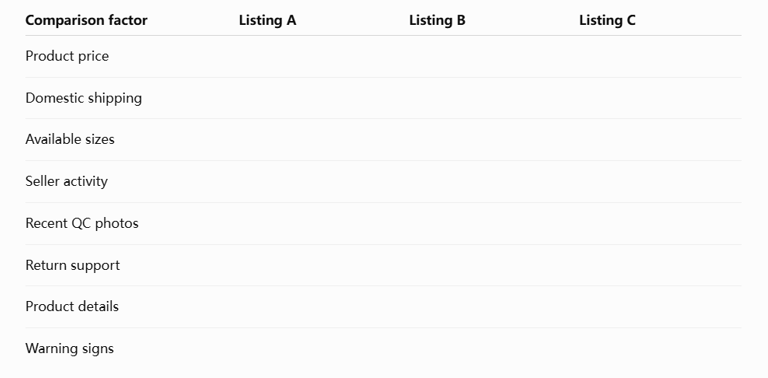
A simple comparison table can make the decision easier.
Record the following for each listing:
This approach reduces the chance of selecting a product based on one attractive detail.
It also helps identify which seller offers the best balance of price, information and flexibility.
When the Cheapest Listing May Be Suitable
A lower-priced listing is not automatically a bad choice.
It may be suitable when:
The product is simple
Measurements are clear
Recent QC photos are consistent
The seller is active
The buyer accepts minor differences
The return conditions are reasonable
The product is not difficult to inspect
Budget options can offer good value when the buyer understands the trade-offs.
The problem is not choosing a cheaper listing. The problem is choosing it without checking what has been reduced or changed.
When a More Expensive Listing May Be Worth It
A higher-priced listing may make sense when it provides:
Better materials
More accurate measurements
Stronger recent QC consistency
Better seller communication
Clearer product options
More flexible returns
Faster domestic shipping
A more suitable version
The price difference should correspond to a visible or practical advantage.
Do not pay more only because the seller uses premium marketing language.
Look for evidence in the product details, recent QC photos and seller conditions.
How to Choose the Stronger Product Link
After comparing the available information, choose the listing that offers the best overall combination of:
Current availability
Clear product options
Reasonable price
Useful sizing information
Active seller
Recent QC evidence
Acceptable return conditions
Limited warning signs
The strongest product link is not always the cheapest or most popular one.
It is the listing that gives you enough reliable information to understand what you are ordering and what options remain if there is a problem.
Product and Seller Research Checklist
Before submitting an order, confirm the following:
The original listing is active
The product still matches the spreadsheet entry
The correct option is available
The current price is clear
Domestic shipping has been checked
Seller activity appears current
Product photos are consistent
Recent QC photos have been reviewed
Size information is usable
Materials and details are explained
Minimum quantity is acceptable
Return conditions are understood
No major warning signs are present
If several important points remain unclear, continue researching or choose another listing.
Final Thoughts
The USFans Spreadsheet can save time by helping users discover products and marketplace links, but it should not replace product and seller research.
A strong buying decision usually follows this process:
Find a product in the spreadsheet
Open the current marketplace listing
Verify price, size and options
Review the seller store and activity
Compare product and QC photos
Check return and shipping conditions
Compare several possible listings
Submit the strongest product link
This approach does not remove every risk, but it gives buyers more control over the decision.
The more clearly you understand the product, seller and marketplace listing before payment, the easier it becomes to review the warehouse item and manage any problems later.
Frequently Asked Questions
Does the USFans Spreadsheet verify every seller?
The spreadsheet helps users discover product links, but buyers should still review the current seller, listing details, product options and available QC information before ordering.
Is a seller with the lowest price usually the best choice?
No. The lowest-priced listing may have weaker sizing information, limited returns, high domestic shipping or a different product version.
How can I tell whether a marketplace listing is active?
Check whether product options, stock, prices and purchase functions are available. Recent seller or store activity can also provide useful context.
Are seller photos reliable?
Seller photos can help explain the product, but they may include promotional or factory images. Compare them with recent warehouse QC photos whenever possible.
What should I check on a Weidian seller page?
Review the current listing, seller store, product options, recent activity, available QC photos, price and return conditions.
Why do several sellers use the same product photos?
Sellers may use shared factory images, catalog photos or promotional content. Identical photos do not necessarily mean the products are identical.
Are older QC photos still useful?
Older QC photos can provide general context, but recent QC photos are more useful because sellers, batches and production quality can change.
Should I avoid products without return support?
Not always, but non-returnable listings involve more risk. Buyers should be especially careful with sizing, variants and product details before ordering.
Recommended Links
→ Browse the USFans Spreadsheet
→ Explore USFans Spreadsheet Guides